Introduction
This guide details the fields of data mapping between PSA and Xero Integration. PSA term applies to both BMS and Vorex users.
Pre-requisites
Active setup with Xero. Refer to this guide for the integration details.
Data Mapping
This integration allows two-way sync for items, contacts, and accounts. Invoices can be exported to Xero and Payments can be imported to PSA. 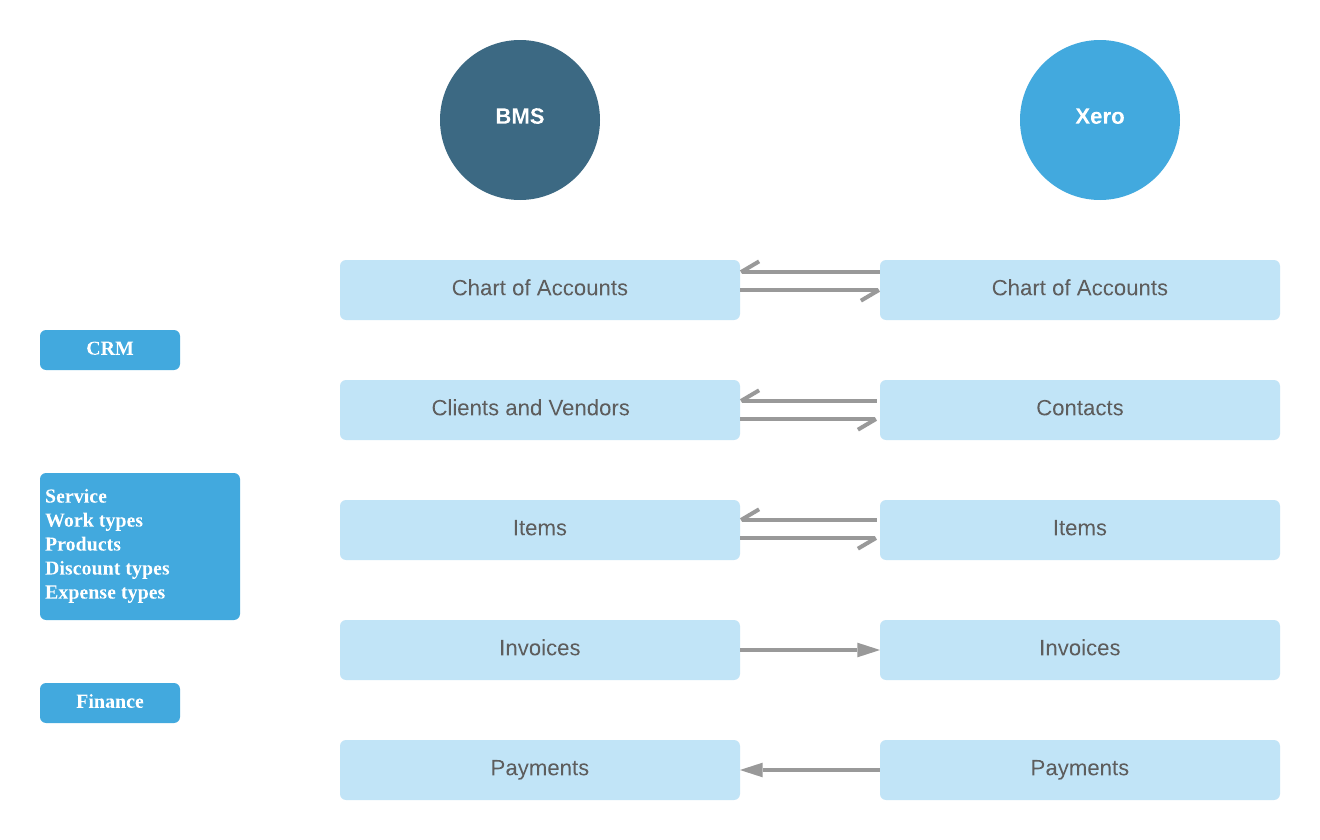
Account Code
|
PSA Fields |
Xero Field |
|
Account Code |
Code |
|
Account Name |
Name |
|
Description |
Description |
|
Account Type |
Type |
-
-
- Account codes: If it exists in Xero we link to the existing entry, we do not update it. If the code doesn't exist we create a new one.
- Account types: We link to the type based on the name if it exists in Xero, If it doesn't we take one by default. The name of default is called Other income.
-
Tax Rate
|
PSA Fields |
Xero Field |
|
Name |
Name |
|
Tax Rate |
Rate |
-
-
- For Tax groups, multiple tax components will be added.
- When importing Tax Rate, we take the name and rate and create it in PSA.
- If it has multiple tax components we disregard it and add it as a normal tax rate. We don’t create separate tax groups for tax components when importing.
-
Accounts
Exporting from PSA to Xero
|
PSA Fields |
Xero Field |
|
Account name |
Contact name |
|
Account code |
Account number |
|
Email address in Billing address |
Email address |
|
Phone number in Billing address |
Phone number |
|
Fax mentioned in Billing address |
Fax |
|
Tax |
VAT |
|
Shipping address |
Street Address |
|
Billing address |
Postal Address |
-
-
- If the account is active in PSA we set it as active in Xero. If the account is inactive it will be set as archived in Xero.
-
Importing to PSA from Xero
|
PSA Fields |
Xero Field |
|
Account name |
Contact name |
|
Account code |
Account number |
|
Default currency |
Currency |
|
Taxable |
VAT - Default sales VAT is set |
|
Sales Tax |
Value from Default sales VAT |
-
-
- If a mapping already exists only the name is updated else a new account is created in PSA.
- The main site is created and addresses are imported from Xero.
- Address fields are imported with the same data mapping as when exporting.
-
Items
Products, Services, Work type, Expense type, Discount type are items in Xero.
|
PSA Fields |
Xero Field |
|
Product Name |
Item Name |
|
Product Description |
Sales Description |
|
Expense Account |
Purchase Account |
|
Income Account |
Sales Account |
|
Requires Procurement (Yes/No) |
I track this item - Yes |
|
Product number |
Item code |
-
-
- For Inventory items (I track this item), the expense account will be the Cost of Goods Sold Account.
- Unit price in PSA will be the Unit price of the Sales item in Xero
-
Work Type
|
PSA Fields |
Xero Field |
|
Work Type Name |
Item Name |
|
Description |
Sales Description |
|
Income Account |
Sales Account |
|
Expense Account |
Purchase Account |
Services
|
PSA Fields |
Xero Field |
|
Service Name |
Name |
|
Unit Price |
Sales Unit price |
|
Unit Cost |
Purchase unit price |
|
Description |
Sales Description |
Expense Type
|
PSA Fields |
Xero Field |
|
Name |
Name |
|
Description |
Sales Description |
Discount Type
|
PSA Fields |
Xero Field |
|
Name |
Name |
|
Description |
Sales Description |
|
Discount type |
Will be set to Amount |
|
Value |
Sales unit price |
-
-
- For all the above items, if the item name is empty in Xero, the value in code will be taken.
- For the Taxable field, the mapping is from I sell this item. If a value is set in Xero it will be pushed to PSA. If it's empty or none then the item will be marked non-taxable.
- Income and Expense account mapping is the same for all the items.
-
Exporting items
The data is derived from the Setup options selected in PSA.
|
PSA Fields |
Xero Field |
|
Name |
Name |
|
Description |
Sales Description |
|
Discount type |
Will be set to Amount |
|
Value |
Sales unit price |
-
-
- When exporting an item the account is taken on the Item level.
- Item level option (Finance > Item type > Income account)
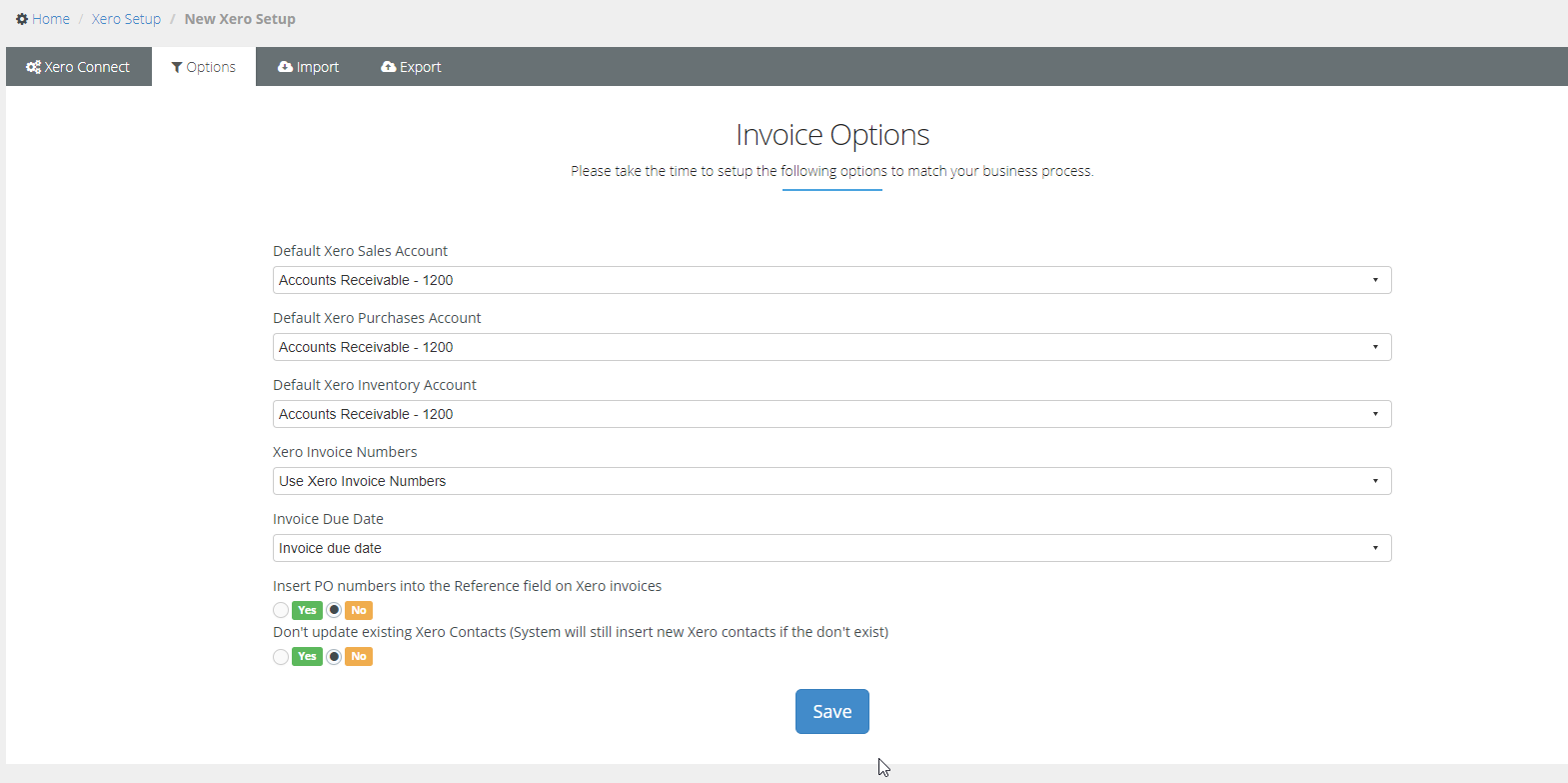
- If the item level is empty it will take the default option in the setup ( Finance > Xero > Setup)
- Default Xero Inventory account, PSA doesn't have default inventory accounts so we rely on the setup option. Its always recommended to use the Inventory -630
- When exporting an item the account is taken on the Item level.
-

Exporting Invoices
The data is derived from the Setup options selected in PSA. Below are the fields when exporting an Invoice.
|
PSA Fields |
Xero Field |
|
Account |
Contact |
|
P.O.Number |
Reference number |
|
Invoice Date |
Invoice date ( Setting in Setup options ) |
|
Due Date |
Due date |
|
Tax Item |
Sales Tax |
|
Total Price |
Total ( auto-calculated based on items and tax) |
|
Grand Total |
Balance due |
| Address |
Billing address |
Invoice Items
|
PSA Fields |
Xero Field |
|
Item Name |
Item Code |
|
Description |
Description |
|
Quantity |
QTY |
|
Unit Price |
Unit Price |
|
Total Price |
Amount |
|
Taxable |
Taxable (Yes/No) |
-
-
- If the item is taxable in an invoice, the value will be sent to the Tax Rate field in Xero.
- If it's not taxable then it will be No VAT or Tax-exempt, depending on your company.
-
Payments
|
PSA Fields |
Xero Field |
|---|---|
|
Account |
Contact |
|
Payment Date |
Payment Date |
|
Reference # |
Reference no |
|
Invoice Number |
Invoice number |
|
Amount |
Amount Received |
Related articles
Refer to this guide for FAQs | BMS with Xero
Refer to this guide for Data mapping details - Data mapping : Xero and BMS